


Launcher OS™ Pro
4.3309.00 Reviews
App Specs
- Version
- 3.1.6
- Updated On
- License
- $2.99
- Downloads
- 100,000+
- Developer
- Apps Genz
- Categories
- Personalization
- Platform
- Android, iOS
Screenshots
 Analysis by AppCompare
I like the idea of a launcher best when it solves a small, repeated annoyance: an app takes too many taps to reach, or the home screen feels cluttered every time I unlock my phone. Launcher OS™ Pro is aimed at people who want to reshape that everyday starting point, rather than replace every part of how they use Android. Its appeal is personal: you can arrange the screen around your habits and make the phone feel less like a default template.
What happens when the network is part of the experience
Launcher OS™ Pro is a personalization app from Apps Genz, and its central job is to change how the home screen looks and how you move around it. That makes the experience different from a wallpaper app: the value is not just a new image, but the combination of layout, icons, dock, widgets, and gestures. The app has a 4.3 average from around 27,000 ratings, and more than 100,000 installs, so it has found an audience among people looking to adjust their phone’s interface.
Connectivity matters most when I’m browsing or setting up customization options, rather than during the simple act of opening an app from the home screen. I would treat any online browsing for extra visual choices as something to do when the connection is steady, then keep the layout itself practical for daily use. A theme that looks great in a preview is not automatically a good choice if its icons make familiar apps harder to spot.
That distinction is useful if you’re comparing it with the usual alternatives. Your phone’s built-in launcher is generally the straightforward choice if you want a familiar interface with minimal setup. A wallpaper changer only alters the background. A launcher gives you more control over the screen’s structure, but it also asks you to make more decisions and spend time arranging things. I’d choose this app if I genuinely want to change that structure, not just add a new picture.
Choosing it for the way you use your phone
The best fit is someone who enjoys tailoring a home screen and is willing to make a few considered choices. For example, if I check messages, maps, and a calendar repeatedly during the day, I can place those essentials where my thumb naturally reaches and use a less crowded layout for everything else. That small change can save friction without turning customization into a hobby that takes over the phone.
It may be less suitable if you prefer your phone to remain exactly as the manufacturer arranged it, or if you rely on a particular built-in launcher workflow and do not want to relearn where things are. A custom layout can also create a brief adjustment period: an icon you expect in one place may move, and a gesture you set up may take practice. I’d make changes gradually, rather than redesigning every screen at once and then having to search for basic apps.
For a realistic routine, imagine getting ready to leave home while checking the weather, opening a navigation app, and replying to a message. A home screen arranged around those frequent tasks can make the first few actions feel more direct. The useful test is not whether the screen looks striking in a screenshot; it is whether you can still find what you need when you are distracted or in a hurry.
Worth Reading Before You Choose

EA SPORTS FC Mobile 26 Is a Bigger Football Game, but It Takes Time

Flipboard Shows What News Apps Must Do Beyond the Feed

Switching to Android Auto Means Rethinking Your Driving Routine

Google Calendar Makes a Crowded Week Easier to Manage

Ludo King Makes the Most of the Minutes Between Plans

Baby Panda World Brings Quick Play to Modern Phones, but Its Game Library Feels Busy
Making the layout useful, not just attractive
When I customize a launcher, I try to keep one screen for the things I use every day and avoid filling it with every available widget or shortcut. A dense arrangement can look impressive but make the phone harder to scan. I’d also keep important apps in recognizable positions while experimenting with less familiar icon styles elsewhere. That way, the visual change does not slow down the habits the launcher is meant to support.
Gesture controls can help reduce taps, but they work best when each gesture has a clear purpose and is easy to remember. I would start with one or two actions I use often, try them for a few days, and only add more if they feel natural. If gestures overlap with movements I make by habit, or if I keep forgetting what a swipe does, the feature becomes extra mental work instead of a shortcut.
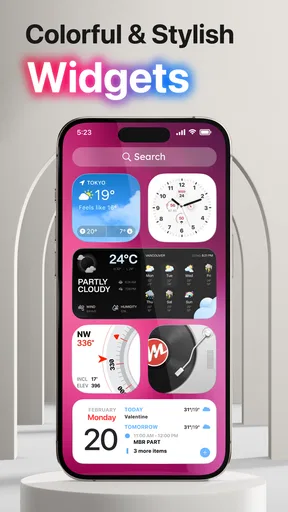
Widgets deserve the same restraint. A calendar or other glanceable item can make a screen more useful, while several large widgets can push the apps you need out of view. I’d build the layout around the information I actually check, rather than adding elements simply because they are available. This is one of the trade-offs of a flexible launcher: more choice is helpful, but it also makes a little editing part of the setup.
Unboxing the Features
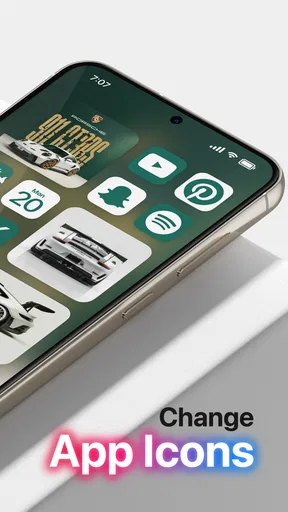
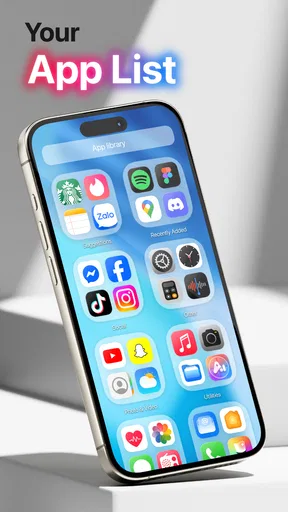
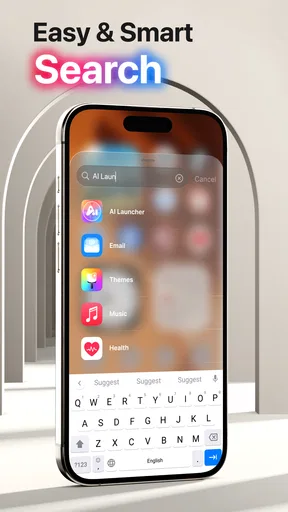
The first thing you’ll notice with Launcher OS™ Pro is its clean, intuitive interface. It’s like your phone decided to put on a tuxedo for a night out. The customization options are endless, making it feel like a playground for your creative side. From changing the app icons to adjusting the grid layout, it’s all at your fingertips.
One of the standout features for me was the gesture control. Swipe up, down, or sideways to access different apps and settings. It’s super handy, especially when you’re trying to multitask. And trust me, once you get used to it, there's no going back.
Performance and Usability
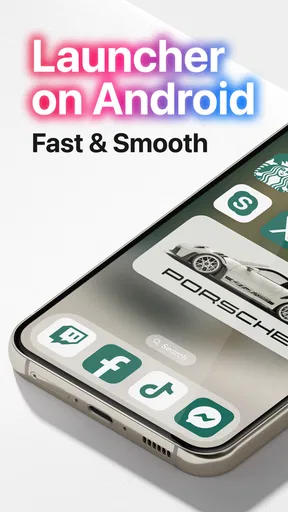
Now, let’s talk performance. I was a bit skeptical at first because, well, who hasn’t had a launcher slow their phone down? But surprisingly, Launcher OS™ Pro keeps things smooth and snappy. It’s like giving your phone a caffeine boost—everything just feels more responsive.
Usability-wise, it’s a breeze. The settings are straightforward, and you don’t need a degree in rocket science to figure it out. Even if you’re not tech-savvy, you’ll navigate through it like a pro in no time.
Personalization at Its Best
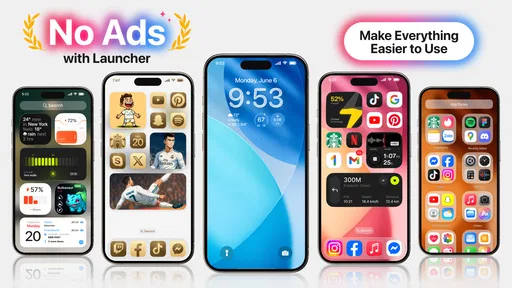
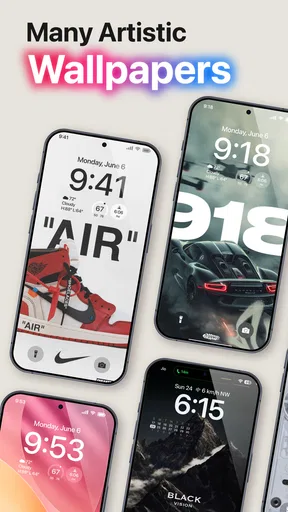
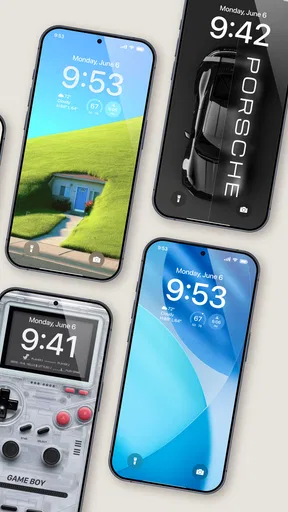
Let’s dive deeper into personalization because, let’s be honest, that’s why we’re here. You can change everything from the icon packs to widgets and even the dock. It’s like having a blank canvas where you can paint your digital masterpiece.
And don’t even get me started on the themes. Whether you’re into minimalism or a burst of colors, there’s something for everyone. Plus, the ability to create your own themes is a game-changer. You can literally make your device one-of-a-kind.
Cost, setup, and everyday trade-offs
The Pro version costs $2.99, with in-app purchases ranging from $0.99 to $79.99 per item. I’d think about that separately from the upfront price: decide whether the included customization is already enough for you before considering any optional purchases. The app is rated for Everyone, and version 3.1.6 requires Android 8.0 or later. Those details make it easier to judge compatibility and suitability, but they do not tell you whether the design will suit your taste; the best check is to start with a restrained layout and see how it feels in your routine.
There is also a practical setup question: what happens if you change your mind? Before spending time on a full redesign, I’d note the positions of the apps I depend on and make one change at a time. If the new arrangement feels confusing, restoring a simpler layout is easier than trying to remember which of many simultaneous edits caused the problem. This gradual approach is especially useful for a shared household phone or a device used for work, where someone else may expect familiar shortcuts.
On a commute, for instance, I would prioritize a clear route to navigation and communication apps, not a busy set of decorative widgets. At home, I might take a little more time to adjust colors and icons. That split illustrates the central trade-off: customization can make the phone feel more personal, but the most useful setup may be quieter than the most eye-catching one. A launcher earns its place when the changes keep helping after the novelty wears off.
When I would choose another option
If all you want is to change the background, a wallpaper tool is the more direct solution. If you want no learning curve and prefer the organization already on your phone, staying with its default launcher is sensible. Launcher OS™ Pro is for someone who wants the home screen itself to behave or look differently and is happy to spend a little time tuning it. That distinction matters: the app’s flexibility is a benefit only if you are interested in making those choices.
I would also avoid assuming that every customization choice is automatically an improvement. A visually consistent icon set can make the screen feel polished, but unfamiliar symbols may slow down quick searches. Likewise, a gesture can feel effortless after practice yet be easy to forget at first. My advice is to judge the setup by how easily you can complete ordinary tasks, not by how many options you have explored.
Why Go Pro?
So, why should you consider the pro version? Well, besides the obvious perks of no ads (hallelujah!), you get access to a treasure trove of exclusive features. The advanced gestures, premium icon packs, and priority support make it worth every penny.
It’s like upgrading from economy to first class. You’ll notice the difference, trust me.
Stability, recovery, and the final call
If a layout feels wrong or a gesture stops being useful, the sensible recovery is to simplify: remove the change that is getting in the way, return frequently used apps to easy-to-find spots, and test the screen again during normal use. I would not make several major adjustments just before a busy day. Trying one change at a time makes it much clearer whether the issue is the arrangement, a hard-to-remember gesture, or simply needing a little practice.
Because a launcher sits at the center of daily navigation, reliability matters more than novelty. If the phone behaves unexpectedly after a change, I’d first check the layout and gesture choices I just made, then fall back to a simpler arrangement. Connectivity can affect moments spent exploring or obtaining customization material, so I would avoid building my routine around something I have not yet tested in the places I use my phone. The key is to keep essential apps easy to reach regardless of whether I’m at home, on a weak connection, or moving between places.
Final Thoughts
All in all, Launcher OS™ Pro is a solid choice for anyone looking to spruce up their phone. It’s not just about looks; it’s about creating an environment where you feel more productive and, dare I say, more you.
If you’re tired of the same old boring interface and want to add a splash of personal flair to your device, give it a shot. You might just fall in love with your phone all over again.
Ready to take control? Download Launcher OS™ Pro today and step into a world of endless possibilities!
Pros
- Smooth and intuitive user interface design.
- Customizable themes enhance personalization.
- Efficient performance with low battery usage.
- Quick access to frequently used apps.
- Seamless integration with system functions.
Cons
- Limited widget customization options.
- Some features locked behind paywall.
- Occasional minor glitches in app drawer.
- Ads can be intrusive in free version.
- Requires frequent updates for stability.
FAQs for Launcher OS™ Pro
What is Launcher OS™ Pro and how does it enhance my device experience?
Launcher OS™ Pro is a customizable launcher app designed to transform your device’s interface, offering a sleek and intuitive user experience. It provides various themes, widgets, and customization options, making it easier to access apps and manage your home screen efficiently. With smoother transitions and personalized layouts, it enhances both the functionality and aesthetics of your device.
Is Launcher OS™ Pro compatible with all Android and iOS devices?
Launcher OS™ Pro is primarily designed for Android devices, providing a wide array of customization options tailored to Android’s flexible operating system. While there are iOS-style themes available, full functionality is optimized for Android. It's essential to check the app store description to ensure compatibility with your specific device model and OS version.
Does using Launcher OS™ Pro impact device performance or battery life?
Launcher OS™ Pro is optimized to run smoothly without significantly impacting your device’s performance or battery life. However, as with any app that modifies system interfaces, some users may experience slight variations in performance based on their device’s specifications. It’s advisable to monitor your device’s performance initially and adjust settings within the app for optimal results.
What customization features are available in Launcher OS™ Pro?
Launcher OS™ Pro offers extensive customization features, including a variety of themes, icon packs, and widgets. Users can personalize their home screen layout, adjust icon sizes, and select transition animations. The app also supports gesture controls and app sorting, providing a tailored user experience that suits individual preferences. Regular updates often introduce new features and enhancements.
Is there a cost associated with using Launcher OS™ Pro, and are there in-app purchases?
Launcher OS™ Pro may offer a free version with basic features, but to unlock its full potential, a premium version is available for purchase. This premium version typically includes additional themes, advanced customization options, and an ad-free experience. In-app purchases are also available for specific themes or features, allowing users to enhance their launcher experience further.


